UP DOWN READY
The versions of the game that were on this page were hosted on Dropbox. Since the recent spike in traffic, Dropbox has cut off access to my public folder. I will hopefully be migrating this stuff across to an actual server, but the version on Kongregate is the official release.
Saturday, September 25, 2010
Moderate success!
Thursday, September 9, 2010
Don't mind the cobwebs
It's been a couple of weeks since we 'officially' released Up Down Ready on Kongregate. We got a really good initial reception, and since then we've had:
- 46,000 plays and counting
- an average user rating of 3.5/5 stars
- US$25.40 in ad revenue
- a whole bunch of player feedback to take into consideration
- a number of reviews and shout-outs (even one in Spanish!), all generally positive and some absolutely glowing
See the full list of reviews &c. on our under-construction homepage HERE
Saturday, August 21, 2010
A horse by any other name...
I have not been great about updating this. THINGS have been HECTIC.
Yes, Henrik and I went to Freeplay, and as you can gather from the sticky post at the top of the page, we WON a thing. The good fairy Freeplay Awards saw fit to turn our little Horse into a Real Game with the magical (rather hefty) wand of Best Design in a Game trophy.
And now that we've gotten through that rather strained metaphor - what is on the cards for me this semester?
Priority number 1: Get the newly christened Up Down Ready onto its feet (hooves?). I am, as we speak, spitting and polishing and integrating with the Kongregate API. We have also bought a domain and hosting, so UDR will be up there as well, with a separate mySQL highscore database.
The 'official' release will happen in the next week, so expect shameless and constant plugging of the game around then.
Then the Viking and I will be moving on to another little game currently known as Snowball. More on that when we get up to it, since we'll need to scope down and just build something as fast and tight as we can. I'm hoping to continue work on the Unity sound handler thing, too, since this semester we have an actual for reals sound designer.
First, though, we gotta get Up Down Ready ready.
In the meantime, be hoopy and stuff.
- your friendly neighbourhood sword lady
Thursday, June 17, 2010
Horses for courses
Some quick documentation for the sound system
The Sound System is a general purpose sound handler written in C# for game development projects in the Unity environment. It is designed to allow developers and/or sound designers to centralise control and handling of all sound effects and music.
Soundscapes are defined in XML and loaded from within Unity. The system itself is comprised of a single gameObject with a set of public static functions that can be called from any other script in the same scene. This mitigates the need for Unity AudioSources to be attached to specific gameObjects, allowing them to be instantiated dynamically at runtime using simple function calls.
Setting Up the System
1. Import the SoundSystem unity package into your project
By default, the system and all attached scripts will be placed in the Standard Assets folder.
If your project uses C#, you may choose to move the SoundSystem to a different location according to the specific requirements of the project.
If your project primarily uses JavaScript or Boo, it is recommended that you leave the Sound System in the Standard Assets folder due to potential compile order issues with non-C# scripts accessing the Sound System.
2. If you have not already done so, import the audio files for use in your project.
These will need to be placed in a Resources folder. An empty Resources folder is provided in the unity package. However, according to the Unity documentation, Resources folders can exist anywhere in the project hierarchy as long as they are correctly named.
3. Setup the XML resource file
The XML template is called SoundSystemXML. You can edit this file directly, or create a copy so that you have a template to refer to.
The XML file should be included in the same Resources folder as your Audio files. This ensures that it will be included when you build the scene. If it is not, you may encounter problems with the audio not playing when exporting your project as a standalone or web player build.
There are three kinds of objects that can be defined in the XML file (I can't display the XML correctly on the blog because the tags look like html and the text doesn't show up).
SoundEffects, which represent a single sound that is played once or looped (eg. Character noises, environment sounds, looping ambient tracks. Can also be used for music). This is basically a single sound clip.
SoundSets, which represent a set of related sounds that can be played randomly once or at set intervals (eg various similar gunshots or explosions, bird calls, lines of character dialogue that can be selected randomly for NPCs). This can have as many clip elements as you like. The numclips property must match the number of clips elements you have included.
SoundPairs, which represent sounds that have an 'initialisation' followed by an indefinite loop (eg. A car starting and then the engine idling for a random period of time). This has two clip elements – the first one listed will be the initialisation sound, and the second the looping sound.
For each object, name is the name you call the object by using sound system functions, and clip refers to the import name of the clip in the Unity Inspector. Keeping these things distinct can be useful if you are using effects from various sources and need to keep track of attribution. All of the name properties you assign must be unique, or the system will not be able to load the sounds correctly.
There can be as many SoundEffects, SoundPairs and SoundSets as you like within the XML file, and they can be placed in any order within the SoundScape.
Using the SoundSystem methods
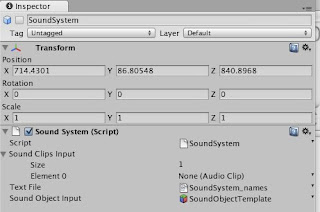
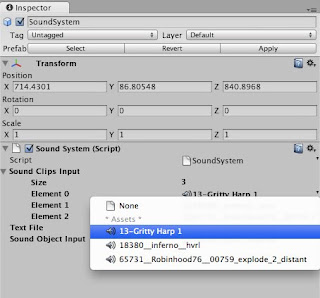
In order to use the SoundSystem methods, you will first need to place the SoundSystem prefab somewhere in your scene.
In the inspector, you will need to change the public variable XMLFilePath on the prefab to reflect the location in the project of your XML file. The default example is Assets/Standard Assets/Resources/SoundSystemXML.
SoundSystem methods are called from any script in the same scene as follows:
SoundSystem.methodName(“soundName”, objToPlayAt);
where soundName is a string and objToPlayAt is a gameObject (in most cases this will be the gameObject attached to the script you are calling the sound system from.
Some methods are overloaded to allow the user to specify volume as well. In later iterations, these will be further extended to provide finer control over how the sounds play.
The functions available in the current build of the SoundSystem are
playOnce(String Name, GameObject Caller)
This plays a one shot sound using Unity's playClipAtPoint() functionality and can be called on any clip loaded into the sound system, even ones contained within a SoundSet or SoundPair.
play(String Name, GameObject Caller)
play(String Name, GameObject Caller, float volume)
These play the sound object with the specified name once and parent it to the Caller object. Can be called for any kind of the three sound objects.
startLooping(String Name, GameObject Caller)
startLooping(String Name, GameObject Caller, float volume)
These start the sound object with the specified name looping and parent it to the Caller object. Can be called for any kind of sound object.
stopLooping(String Name, GameObject Caller)
This will stop the named clip from playing, and turn off looping. Can be used to cut a playing sound short if required. Can be called for any kind of sound object.
playAtInterval(String Name, GameObject Caller, float interval)
playAtInterval(String Name, GameObject Caller, float minInterval, float maxInterval)
playAtInterval(String Name, GameObject Caller, float minInterval, float maxInterval, float volume)
This will start the named SoundSet playing a random clip at the specified interval, or at a random interval between the specified max and min intervals. Can currently only be called for a SoundSet object, a SoundEffect or SoundPair will simply do nothing and log a SoundSystem warning.
I will upload and post a link to the current version of the Unity Package, so if anyone wants to play with it they can. I will also be updating this documentation as I further develop the system - it's still very much in the early stages.
Saturday, May 29, 2010
Also also
There's a new mode though!
Codespam
News from the northern front, at last! Also: using SWC files with Flixel in Flex Builder 3
[Embed(source = "data/bg2.png")] protected var ImgBG2:Class;
// needed for processing bitmapdata
import flash.utils.getQualifiedSuperclassName;
if(!checkBitmapCache(key))
{
//--------CHANGED CODE FOR PROCESSING BITMAPDATA FILES CONTAINED IN AN SWC
/*replaces/adds to the following line:
_cache[key] = (new Graphic).bitmapData;
code found at http://flixel.org/forums/index.php?topic=628.msg4563#msg4563
thanks to flixel forum user L_O_J*/
var classType:String = getQualifiedSuperclassName(Graphic);
if (classType.indexOf("BitmapData") == -1)
{
_cache[key] = (new Graphic).bitmapData;
}
else
{
_cache[key] = new Graphic(0, 0);
}
//---------------------------------------
if(Reverse) needReverse = true;
}
Friday, May 14, 2010
For certain values of progress
Friday, May 7, 2010
Implements
The current version of the sound system is now active in Blockets, Bullet, and the non-GFS project Migration. It went straight into both Blockets and Bullet with no real problems, and the coder on the Migration Project (Michael the Machine) is currently working to allow the system to talk to the gameplay engine he's written (most of which sits outside Unity and interfaces with the scene through a single class).
There was some good feedback from my fellow developers about what other kinds of functions they would like to see in the system, as well, which I diligently wrote down on my list.
I also had a chat to the Islands team about sound for their game, and this was what really got me thinking - their game has five unique areas with distinct soundscapes, which means I need a bigger and more complex class structure to contain this stuff and allow things to be called when required.
Without further ado, this is a list of ideas that I will be considering for the next build of the sound system, in no particular order.
- functions to fade sounds in and out and set volume
- functions to set up sounds that need to be attached to gameObjects (and possibly functions to kill them if they are no longer needed)
- "Sound Scape" objects, which contain all the sounds for a specific area of the game, with master play, stop and fade functions
- "Sound Sets", which contain arrays of related sounds (eg. various similar explosion sounds), so you could do things like this:
- play the sounds from the array in a set or random order at a set or random interval
- play a random one-shot sound from the set
That's my thinking so far, and what I will be working on with regard to the sound system over the next week or so. Other suggestions for useful things to do with sound are most welcome!
Sunday, May 2, 2010
Who put this milestone here? I could have tripped!
Sunday, April 25, 2010
Bang! (Clay pigeons are fuckers)


Tuesday, April 20, 2010
Quiet in here, isn't it?
Net result: I got almost nothing ticked off my list.
But I do now have a project plan and task list that stretches to the end of semester.
Hooray.
This week (Week the Seventh): mad rush to catch up and put myself back in a balanced position.
Right now: Going to sleep, because I need it.
Tuesday, April 13, 2010
Lists - Week the Sixth
Horse takes on Supanova
Wednesday, April 7, 2010
Make some noise about it
So, for those of you with no attention spans who require images, this is what I have been working on:

Part of the music for Bullet, so far. This was based on my brief of 'epic strings' a la Hans Zimmer's work in The Dark Knight. It's scored for string orchestra plus timpani, bass and snare drum, and to be honest, it came out kinda Philip Glass (Philip Glass, Philip Glass, Philip Glass /music joke).
You can listen to a first musical 'sketch' of themes and ideas for Bullet here.
Bear in mind that the samples are the default output from Sibelius (the notation program, not the composer), and is kind of dodgy sounding. This will not be the final sound - it's just to give an idea of the harmonic structure and the kinds of motifs I want to layer in the music.
I'm fond of that triplet figure, even though it would be kind of horrible to play. Fortunately this won't be getting recorded, so I can fudge the samples as much as I like in Pro Tools. But in any case, Tyson and I have agreed that this first attempt is too dark for the game in question - Tyson pointed out that he felt like he should be killing kittens if this was in the background while he played. The next step, from where I'm standing, is to get rid of some of the heavier scoring in the bottom end and adjust the chord structure underscoring that top motif in the violins so that it's a little bit less edgy but still has a lot of depth.
Waiting to hear from the rest of the team before I make a move on this, though.
Next on the list was Islands:

Musical 'sketch' for Islands is here.
There's not as much stuff here, because it was really really easy for me to nail down the main motif. Going for that floaty Jo Hisaishi piano sound, a la Spirited Away. It accidentally ended up moving into 5/4 after those three introductory bars when I started noodling around with the chords on the piano, and it works really well because the extra beat gives it that slight lilt that emphasises the sense of air and flight.
I'll be eventually writing modulations, chord changes and variations on the theme (chords need work. I am not a pianist and I don't do interesting ones naturally), as well as instrumental parts to bring in and out, but this main motif will always be at the heart of it. This one I do want to record the parts for. On top of the piano, I want to write at least a sax part and a flute part, and maybe a guitar part. I am now wondering if I have any favours to call in from, say, horn players or oboists...
Anyway, I am still waiting to hear back from the team on this one.
My sound system is also making some progress, but I want to go back to focussing on implementing some more things in Horse, and writing music for it. I'd like to have a reasonable version of it ready for Supanova this weekend, so tomorrow is a Horse day.
Wednesday, March 31, 2010
Fuck screenshots...
Controls: Up and/or Down. That's it. That's all you get. Every time the mode changes, the effect of those two buttons changes. It's up to you to figure the rest out.
Iteration the Furst: this is the version that was presented as a prototype on Wednesday 24 March
Feedback was mostly on the pacing - changing to a different screen between modes really disrupted the gameplay, and it felt a little slow. It's also perhaps a little too hard.
Iteration the Next: this is the slightly updated version that was presented for more different feedbacks on the following Monday. Not much changed, really, except for pacing. The whole thing is kind of more hectic (and possibly confusing?)
Still probably too hard, harder than the previous version, because it's faster. Some useful stuff came out of the feedback session, most importantly that we need to nail down our target audience before we iterate more. There are also plans in the wings for more player feedback and clearer flagging of new game modes. Some complaints were made over the acceleration and drag on the character movement, too. I am currently in the process of stripping down the code base and turning it into a more modular system.
ALSO the text is off-centre and it bothers me. I will fix that at some point.
Tuesday, March 30, 2010
Target Practise
Week 6
Primary: Sound design breakdowns complete
Placeholder SFX implemented in projects
Secondary:
Story treatment roughs completed
Week 7
Primary:
Initial rough music concepts
Secondary:
Design documentation completed, if required by teams
Week 8
Primary:
Sound system initial version complete
Week 9
Primary:
Music concepts complete and locked in
Week 10
Primary:
Majority of SFX recorded/produced and in place
Week 11
Primary:
Sound system final version complete
Week 12
Primary:
Music composition and production complete
Going solo, update
Mostly copied and pasted from my individual contract for this semester, but it helps me to put it up here.
Primary Goals
Sound Design
I will write sound design breakdowns for at least 3 – 4 projects (initially I am thinking for Horse, Bullet, Lantern and Islands), if not all of them. This includes lists of sound effects required, brief documents discussing the choices made in the sound design and the intended impact of sound and music on the player.
Sound Programming
I will build and maintain a sound system for use in Unity projects to streamline the inclusion of sound in the game. This is dependent on the nature of each game, whether the sound needs to be simulated in 3D space or not, and the needs of the separate teams.
I am still unclear as to the exact nature of this system. I am hoping that over the next week with some more feedback I will be able to define the problem better and start building a solution.
Music Composition/Effects Production
I will be composing most, if not all, of the music for Horse. This will include different tunes with various arrangements and styles for different stages of the game. While initially the music should have an 8-bit feel to match the retro look of the game, it should change frequently and drastically, in accordance with the subversive nature of the game design.
I have also been asked to compose the music for Bullet. The current music direction suggested is something on the lines of 'epic strings'.
I am keen to compose music for Islands, as this would allow me to explore a slightly different realm of composition – rather than music that is based specifically on the visuals or the theme of the game, Islands requires music that evokes a specific emotional reaction in the player.
Over the course of the projects, I will build up a library of sound effects based on the sound design for each game. Some of these may be generated using synths or tools such as SFXR, others will be Foley and general effects recorded at my home studio or sourced from various free sound effects libraries.
Secondary Goals
Story treatments
Subject to the desires of the core teams, I will be assisting with the development of narrative contexts for the Lantern and Islands projects. If this goes ahead, I will be writing story treatments for both games that form part of the overall design and inform the use of the gameplay mechanics involved.
Design Documentation
This is less of an individual focus and more of an element of the overall group design work. I am including it here because I have a specific interest in synthesising design ideas into a clear written format that effectively communicates the core concept of a project. I would like to use my writing abilities to help teams bring their ideas together into a cohesive whole that can be used for reference during development.
I will put my scheduling goals in a separate post, so that I don't get tl;dr problems when I need to refer back to them.
Friday, March 26, 2010
The Prototype - Retrospective
I think, overall, it went pretty well. Everyone had something to show that answered some of the questions raised by the pitches, and the feedback and criticism given was generally constructive and meaningful.
The presentation of Fishman didn't go too poorly. I was of course disappointed that I wasn't able to demonstrate it clearly, but the reception of my explanation was not received as harshly as I might have expected. I think a large part of the problems that occurred with the prototype of Fishman was that Henrik and I were trying to tackle the prototyping of two games with just the two of us, while other teams were focussing on a single game or spreading the workload to more team members (the work for Lantern and Islands, collectively, was split between four people).
The key problem, however, was the inability of ordinary keyboard interaction to accurately demonstrate the gameplay mechanic. Fishman is something of an input gimmick game (this is not strictly a bad thing), and it really doesn't work without the mic input. I had put together a very simple demonstration in processing of how the volume information from the input could be used to raise and lower the height of a bar, but unfortunately the microphones on the lab computers weren't working.
The net result is that Henrik and I have decided to put Fishman on the backburner at this point. We are not giving up completely on the idea, and I for one still think it has the potential to be an interesting game, but I don't want to sink time solely into trying to get the code the input analysis to work properly when I could be developing something that I know we have already proven.
The presentation of Horse, on the other hand, was fairly successful. I think the prototype helped us towards answering the question about timing - there was some pertinent feedback given on this, particularly that the game should continue running when the player gets an alert that the gameplay is about to change. It was also recommended that we make the different stages more distinct, which I know was something Henrik had been planning on anyway. Over the weekend, I will be working on passing the game information between the gameplay states so that the player's experience of the game doesn't get put on hold when the state changes, while Henrik will be developing more art and designs.
We'll also both be tinkering around with writing some silly dinky 8bit music to put into the prototype, with musagi (I will probably also faff around with midi data in Pro Tools).
With regard to other people's prototypes, there was some really nice work demonstrated - some in particular that I would like to be involved in the initial design and writing stages of, as long as the core team members are willing to have me on board. I'll probably be sending out a few emails with more detail to this effect.
That's all I can think of that needs to be addressed for now. I am of course working out my individual contract to deliver to Matt by the end of the day.