UP DOWN READY

Hi there! You've probably reached this page from the Freeplay website in search of the elusive 'Up Down Ready' which took Best Design in this year's awards.

UPDATE: Hello! If you've arrived here from StumbleUpon, why not go play the game now on Kongregate! With high scores and EVERYTHING.

The versions of the game that were on this page were hosted on Dropbox. Since the recent spike in traffic, Dropbox has cut off access to my public folder. I will hopefully be migrating this stuff across to an actual server, but the version on Kongregate is the official release.

I'm Delia, the Sword Lady half of Sword Lady and the Viking. You can find my teammate over here. We are third year students in the Games Design course at Griffith University, and Up Down Ready (previously known as Horse) is our first semester project from this year, made using Adam Atomic's free Flixel library.

We entered it in the Freeplay Awards for a lark, and were incredibly surprised and excited to make it to the finals and take away an award. We hope you enjoy playing the game as much as we enjoyed making it!

- Delia
Showing posts with label sound. Show all posts

Friday, May 7, 2010

Implements

On Wednesday, I had the opportunity to actually integrate the early sound system build into a few projects to see if it would explode horribly. So far it hasn't, although a number of inevitable bugs have been revealed by the in-project testing, which were fixed on the fly.

The current version of the sound system is now active in Blockets, Bullet, and the non-GFS project Migration. It went straight into both Blockets and Bullet with no real problems, and the coder on the Migration Project (Michael the Machine) is currently working to allow the system to talk to the gameplay engine he's written (most of which sits outside Unity and interfaces with the scene through a single class).

There was some good feedback from my fellow developers about what other kinds of functions they would like to see in the system, as well, which I diligently wrote down on my list.

I also had a chat to the Islands team about sound for their game, and this was what really got me thinking - their game has five unique areas with distinct soundscapes, which means I need a bigger and more complex class structure to contain this stuff and allow things to be called when required.

Without further ado, this is a list of ideas that I will be considering for the next build of the sound system, in no particular order.

- functions to fade sounds in and out and set volume

- functions to set up sounds that need to be attached to gameObjects (and possibly functions to kill them if they are no longer needed)

- "Sound Scape" objects, which contain all the sounds for a specific area of the game, with master play, stop and fade functions

- "Sound Sets", which contain arrays of related sounds (eg. various similar explosion sounds), so you could do things like this:

  • play the sounds from the array in a set or random order at a set or random interval
  • play a random one-shot sound from the set
-"Paired Sound" objects, which contain an 'initialisation' sound (eg. a jetpack firing up) and a looping sound that seamlessly follows it

That's my thinking so far, and what I will be working on with regard to the sound system over the next week or so. Other suggestions for useful things to do with sound are most welcome!

Sunday, April 25, 2010

Bang! (Clay pigeons are fuckers)

The first build of the Sound Effects Handler for Unity is go!

It is a single invisible GameObject that sits quietly in your scene until you invoke one of its public static methods from another script, whereupon it makes some kind of noise. It is dead simple, but it took a while for my thinking to progress to the stage where I could make it so.

The basic premise of the handler is that it centralises all of the sound effects contained in the scene.

As far as I know, Unity is designed to handle sound by attaching to objects AudioPlayer components, the functions of which are then called from that object's script. While this approach has its uses, it is one that I can only imagine would be immensely frustrating for a sound designer who had no contact with the game other than to provide sound effects.

Funnily enough, this is the role that I am taking on with all of the class' projects bar Horse. I decided that I wanted an interface that allows me to put all the sound effects into a scene and then say to my fellow developers this:

"Here are your sounds. This is what they are called. Here are some simple lines of code to make them play or stop, which you can call from any other script in the scene. Have fun, please try to leave my code alone, and call me over if you have problems."

And this is exactly what I plan to do.

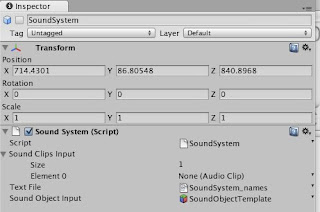
At a glance, the SoundSystem prefab I have built looks like this:


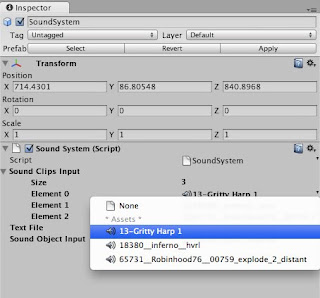
The script property called "Sound Clips Input" is a public array where you put all your sound clips.


You may notice that some of them have pretty weird convoluted names that will be impossible to remember when you want to call one. The solution is in that Text File property of the script.

The Text File links up the names you want to attach to the sound with their initial file names. At the moment, it has to be set up by hand, but for the scope of these projects, it won't take long enough to be an issue.

In my example project, the contents of the text file look a little something like this:

blues=13-Gritty Harp 1
rocket=18380__inferno__hvrl
bang=65731__Robinhood76__00759_explode_2_distant

On the left, the new name for the sound. On the right, separated by an '=' symbol, the original file name. This gets read and set up inside the SoundSystem script when the scene starts. Simple, no? (As testing progresses this week, I will put some thought into if there are more efficient ways to manage this.)

The Sound Object Input property contains a template "Sound Object", which is a GameObject containing a blank AudioSource. This is what I use to create and play what I call 'state-based sounds' - those that loop continuously when an object is in a certain state e.g. character footsteps. This template shouldn't really be editable - I suspect there is a way to link up script properties to assets in code rather than the inspector, which I will look into in a later iteration.

At the moment, the Sound System script contains three public static functions with which developers need be concerned. They can be called from any script in the game. It does not require an explicit reference to the SoundSystem object within each script. Just use this syntax:

SoundSystem.functionName(parameterA, parameterB);

These functions are as follows:

playOnce(string Name, GameObject Caller)

This function plays the sound with name Name once at the position of the GameObject Caller, and then immediately destroys the AudioSource and cleans it up. (For those interested, it uses Unity's built-in playClipAtPoint function).

The Name should be the name of the sound as specified in the text file, and the GameObject is the object at which you want the sound to occur. Usually this will be the object the script is attached to, which would be written as this.gameObject.

startLooping(string Name, GameObject Caller)

This starts the sound with name Name looping continuously at the position of the GameObject Caller.

It does this by instantiating the Sound Object Template prefab at the position of the Caller object and changing the blank AudioSource clip to the clip called Name. This new object is then parented to the Caller object, so that if the caller object changes position, the sound effect will pan and fade accordingly.

If there is already a Sound Object attached to the Caller GameObject, the script will simply call Play() on the AudioSource component of this object, rather than creating a new object.

stopLooping(string Name, GameObject Caller)

This finds the looping sound with name Name at the GameObject Caller and stops it playing.

If this function is called from an object that has no such sound playing, the Sound System will print an error to the console.

So, that's the basics of the Sound System.

I have also collated a bunch of placeholder sound effects to be used in most of the games, so I will be implementing and testing the system with the rest of the class this week. I have a list of things I would like to iterate on as I progress through the rest of semester, and I am sure my fellow developers will have useful things to add to it.

Sunday, March 21, 2010

Going solo

Hey there cats and kittens. This is your recently-appointed resident sound guy talking (okay, sound girl, technically, but that sounds naff and wishy-washy).

Finally getting around to blogging about my individual role for this semester's projects, so that all of you (my current developers-in-arms) what's going on, and what you can ask me for if you need it.

The way I am currently thinking about it, the role of sound in these projects can be broken down into three areas:

1. Design

The decision-making process. This is really key to the what, if any, impact sound has on the way the player plays the game, and the player's impression of the game.

Off the top of my head, this is the sort of stuff I can work with people on, if you guys want my input:

  • deciding where and if music or sound effects should be used
  • picking and choosing the right kinds of sounds and the right places to use them
  • what will they signify to the player?
  • do they serve as feedback or stimulus?
  • will the player be able to read them correctly?

2. Sound programming

I would really like to build some kind of simple system that everyone can use to easily organise and trigger sounds and music for their games (probably in Unity, since the majority of projects will be happening in that).

I haven't had a chance to think too deeply about this yet, and I would welcome feedback on the kind of system people would like in order to help them streamline the audio pipeline. How would you guys like to be able to handle sound in your scripting?

3. Composition/Recording

This one is slightly trickier. I am a little rusty in this area, and I am not sure how quickly I will be able to produce music and/or effects. At this stage, I'm going to say tentatively that I will do the music for two projects this semester. These are actually already pretty much set - I'd like to compose for Horse, because there is the potential for a lot of fun and silly chiptuning there, and Tyson has already lined me up to work on their Bullet game, so unless the projects get especially shuffled around these two are pretty much locked in.

That said, if people want me to record Foley or create SFX (or even come over to my place and do their own while I record), I am happy for this to be arranged.

Do let me know if you want this facility available to you as an option, because I need an excuse to go get a new mic + monitoring headphones, and I will need time to sort that out.

So, in a nutshell, get in touch if you want soundie stuff, kids.

Monday, March 8, 2010

Game Concept 3 - Hyperacusis

Disclaimer: I firmly believe this concept is too ambitious for this project year, and will in all likelihood not be pitching it because I won't have time in my pitch, but I wanted to put it up here anyway.

Working Title: Hyperacusis

Genre: First-person puzzle/adventure (somewhere between Myst and Half-Life?)

Platform: Unity Web/PC

First-person, 3D

Core concept/s:
  • imagine any first-person shooting game that involves killing hostile or dangerous aliens
  • what if you couldn't see them, couldn't touch them, didn't know how to hurt them - because all they are is a sound?
Environment:
  • either a desert or an arctic environment - an open space the player can explore with some signs of civilisation
  • the player's "home base" is a research station of some variety (more than a little generic, there) where they return to replenish their health etc
  • the whole area is completely abandoned and devoid of life
  • the only signs of people are abandoned belongings and homes, and the occasional corpse for good measure
Objective:
  • the player is alone in the environment, which they have to explore at first
  • they will come across non-corporeal 'sound creatures' who are embodied by noises which are severely harming to the player character
  • the player must explore, find items, and progressively discover how to destroy the sound creatures
  • overall goal is to wipe them out completely from the gameplay area
Gameplay:
  • there are a variety of different sound creatures in the area, which have different effects on the player character and different weaknesess the player can exploit
  • the creatures are limited to different 'zones' - most of them do not move around, so the player can remember their locations
  • when the player enters the zone around a creature, they will first hear a warning sound that indicates an enemy is nearby (eg/ a high-pitched, grating whine). The nature of this sound may give a clue as to the sound generated by the creature
  • when the character is exposed to a creature, s/he loses health and the player may not be able to fully control the character's movement
  • the creatures can only be defeated with sound
  • the character's main 'weapon' is a handheld sound recorder and playback device
  • at the research station, the character has a very simple interface to be able to record and mix sounds from elements in the environment
  • the correct combinations of sound played back at the creature will destroy it
  • when a creature is destroyed, the zone it inhabited becomes completely 'dead': there is no atmos, and any player-character created sounds are almost inaudible - as if the creature sucked the sound out of the area as it died
Other mechanics:
  • initially, the only item the player has is a pair of earmuffs. These cut out the sound of the creature and reduce the health loss experienced by the player character
  • however, they inhibit the player's ability to respond to the creature - the sounds the creatures make are cyclic and pulsing in nature, and the player must record starting on a pulse, or the recording will be useless
  • the earmuffs can only be used to allow the player to explore some areas in relative safety - however, they are completely ineffectual against some of the more powerful creatures, who can pierce through them

Obstacles/game elements:
  • some creatures can be temporarily stopped by the character making noise (stomping, clapping, vocalising), but this will not destroy them
  • some creatures can be destroyed simply by being played back at themselves (a more extreme version of holding up a mirror to an animal to make it aggressive)
  • others are not so simple
  • for some, the sound must be manipulated in some fashion
  • for others, the sound cannot be properly recorded, and must be synthesized using elements from the environment, character vocalisations etc
  • the way the player character responds to the sound can be a clue about how to defeat it
Examples:
  • if the character becomes hyperactive and frantic (camera shake, over- sensitivy to controls), the sound needs to be slowed down to defeat the creature
  • if the character becomes slow and dull (blurring vision, reduced sensitivy to controls), the sound needs to be sped up to defeat the creature
  • if the character becomes disoriented (inverted controls), the sound needs to be played backwards to defeat the creature
Sound:
  • Obviously the entire premise of the game is based around the use of sound and the player learning how to respond to sound instead of visuals
  • there would be no background music - the soundscape would be comprised of atmos and ambient noise
  • no animal or human sounds except the player and things left behind by the researchers to add to the story and mood
Other visual elements:
  • obviously this would require some more complex first-person character animations
  • however, the environment and animations could be simplified to be more stylised
  • since the use of sound in the game is not entirely realistic or physically accurate, the player may be more inclined to accept less realistic graphics - though this may detract from the strangeness of the situation with which the player is faced

Potential problems/other issues of interest:
  • There are so many problems with this idea like you would not believe
  • As mentioned, the project is far too ambitious for the time allowed
  • I think the core concept is solid but I am not happy with the specifics of gameplay - they seem both lacking and overly contrived
  • the concept of the earmuffs to allow the player to move around in a less inhibited way is good, but doesn't cohere well with the other ideas about recording/playback
  • earmuffs could be replaced with simply the character putting their hands over their ears - during which, of course, they can't perform any other actions except movement through the environment
  • also toyed with the idea of a sinewave generator, with the player trying to match the core frequency of the creature - possibility of finding multiple 'weapons' as in a traditional FPS
I really like the idea, but it needs a LOT of work, both conceptually and for execution.