UP DOWN READY

Hi there! You've probably reached this page from the Freeplay website in search of the elusive 'Up Down Ready' which took Best Design in this year's awards.

UPDATE: Hello! If you've arrived here from StumbleUpon, why not go play the game now on Kongregate! With high scores and EVERYTHING.

The versions of the game that were on this page were hosted on Dropbox. Since the recent spike in traffic, Dropbox has cut off access to my public folder. I will hopefully be migrating this stuff across to an actual server, but the version on Kongregate is the official release.

I'm Delia, the Sword Lady half of Sword Lady and the Viking. You can find my teammate over here. We are third year students in the Games Design course at Griffith University, and Up Down Ready (previously known as Horse) is our first semester project from this year, made using Adam Atomic's free Flixel library.

We entered it in the Freeplay Awards for a lark, and were incredibly surprised and excited to make it to the finals and take away an award. We hope you enjoy playing the game as much as we enjoyed making it!

- Delia
Showing posts with label sound programming. Show all posts

Thursday, June 17, 2010

Some quick documentation for the sound system

This might be kind of dry, because I haven't had a chance to go through and add screenshots etc. But here is the documentation for the Sound System as it stands now.

The Sound System is a general purpose sound handler written in C# for game development projects in the Unity environment. It is designed to allow developers and/or sound designers to centralise control and handling of all sound effects and music.

Soundscapes are defined in XML and loaded from within Unity. The system itself is comprised of a single gameObject with a set of public static functions that can be called from any other script in the same scene. This mitigates the need for Unity AudioSources to be attached to specific gameObjects, allowing them to be instantiated dynamically at runtime using simple function calls.

Setting Up the System

1. Import the SoundSystem unity package into your project

By default, the system and all attached scripts will be placed in the Standard Assets folder.

If your project uses C#, you may choose to move the SoundSystem to a different location according to the specific requirements of the project.

If your project primarily uses JavaScript or Boo, it is recommended that you leave the Sound System in the Standard Assets folder due to potential compile order issues with non-C# scripts accessing the Sound System.

2. If you have not already done so, import the audio files for use in your project.

These will need to be placed in a Resources folder. An empty Resources folder is provided in the unity package. However, according to the Unity documentation, Resources folders can exist anywhere in the project hierarchy as long as they are correctly named.

3. Setup the XML resource file

The XML template is called SoundSystemXML. You can edit this file directly, or create a copy so that you have a template to refer to.

The XML file should be included in the same Resources folder as your Audio files. This ensures that it will be included when you build the scene. If it is not, you may encounter problems with the audio not playing when exporting your project as a standalone or web player build.

There are three kinds of objects that can be defined in the XML file (I can't display the XML correctly on the blog because the tags look like html and the text doesn't show up).

  • SoundEffects, which represent a single sound that is played once or looped (eg. Character noises, environment sounds, looping ambient tracks. Can also be used for music). This is basically a single sound clip.

  • SoundSets, which represent a set of related sounds that can be played randomly once or at set intervals (eg various similar gunshots or explosions, bird calls, lines of character dialogue that can be selected randomly for NPCs). This can have as many clip elements as you like. The numclips property must match the number of clips elements you have included.

  • SoundPairs, which represent sounds that have an 'initialisation' followed by an indefinite loop (eg. A car starting and then the engine idling for a random period of time). This has two clip elements – the first one listed will be the initialisation sound, and the second the looping sound.

For each object, name is the name you call the object by using sound system functions, and clip refers to the import name of the clip in the Unity Inspector. Keeping these things distinct can be useful if you are using effects from various sources and need to keep track of attribution. All of the name properties you assign must be unique, or the system will not be able to load the sounds correctly.

There can be as many SoundEffects, SoundPairs and SoundSets as you like within the XML file, and they can be placed in any order within the SoundScape.

Using the SoundSystem methods

In order to use the SoundSystem methods, you will first need to place the SoundSystem prefab somewhere in your scene.

In the inspector, you will need to change the public variable XMLFilePath on the prefab to reflect the location in the project of your XML file. The default example is Assets/Standard Assets/Resources/SoundSystemXML.

SoundSystem methods are called from any script in the same scene as follows:

SoundSystem.methodName(“soundName”, objToPlayAt);

where soundName is a string and objToPlayAt is a gameObject (in most cases this will be the gameObject attached to the script you are calling the sound system from.

Some methods are overloaded to allow the user to specify volume as well. In later iterations, these will be further extended to provide finer control over how the sounds play.

The functions available in the current build of the SoundSystem are

playOnce(String Name, GameObject Caller)

This plays a one shot sound using Unity's playClipAtPoint() functionality and can be called on any clip loaded into the sound system, even ones contained within a SoundSet or SoundPair.

play(String Name, GameObject Caller)

play(String Name, GameObject Caller, float volume)

These play the sound object with the specified name once and parent it to the Caller object. Can be called for any kind of the three sound objects.

startLooping(String Name, GameObject Caller)

startLooping(String Name, GameObject Caller, float volume)

These start the sound object with the specified name looping and parent it to the Caller object. Can be called for any kind of sound object.

stopLooping(String Name, GameObject Caller)

This will stop the named clip from playing, and turn off looping. Can be used to cut a playing sound short if required. Can be called for any kind of sound object.

playAtInterval(String Name, GameObject Caller, float interval)

playAtInterval(String Name, GameObject Caller, float minInterval, float maxInterval)

playAtInterval(String Name, GameObject Caller, float minInterval, float maxInterval, float volume)

This will start the named SoundSet playing a random clip at the specified interval, or at a random interval between the specified max and min intervals. Can currently only be called for a SoundSet object, a SoundEffect or SoundPair will simply do nothing and log a SoundSystem warning.

I will upload and post a link to the current version of the Unity Package, so if anyone wants to play with it they can. I will also be updating this documentation as I further develop the system - it's still very much in the early stages.

Saturday, May 29, 2010

Codespam

Okay so this is mostly a note for myself so that I remember when I go to work on it later.

But I SHOULD be able to fix some performance issues with the sound system by using UnityEngine's Object.GetInstanceId(), which returns a guaranteed unique id for every object. I can concat the unique gameObject id with the name of the soundEffect that has been paired with it and use that as the key when I want to lookup that specific soundEffect instance again.

Which in turn means I can eliminate the Transform.FindChild() call I am making in startLooping and stopLooping.

Which, gentle readers, should make it run faster since I am not searching a gameObject hierarchy every time a sound system method is called.

That said, you should still only be calling startLooping or stopLooping once on a state change, not every frame the object is in a state that needs a sound effect.

/spam

Friday, May 7, 2010

Implements

On Wednesday, I had the opportunity to actually integrate the early sound system build into a few projects to see if it would explode horribly. So far it hasn't, although a number of inevitable bugs have been revealed by the in-project testing, which were fixed on the fly.

The current version of the sound system is now active in Blockets, Bullet, and the non-GFS project Migration. It went straight into both Blockets and Bullet with no real problems, and the coder on the Migration Project (Michael the Machine) is currently working to allow the system to talk to the gameplay engine he's written (most of which sits outside Unity and interfaces with the scene through a single class).

There was some good feedback from my fellow developers about what other kinds of functions they would like to see in the system, as well, which I diligently wrote down on my list.

I also had a chat to the Islands team about sound for their game, and this was what really got me thinking - their game has five unique areas with distinct soundscapes, which means I need a bigger and more complex class structure to contain this stuff and allow things to be called when required.

Without further ado, this is a list of ideas that I will be considering for the next build of the sound system, in no particular order.

- functions to fade sounds in and out and set volume

- functions to set up sounds that need to be attached to gameObjects (and possibly functions to kill them if they are no longer needed)

- "Sound Scape" objects, which contain all the sounds for a specific area of the game, with master play, stop and fade functions

- "Sound Sets", which contain arrays of related sounds (eg. various similar explosion sounds), so you could do things like this:

  • play the sounds from the array in a set or random order at a set or random interval
  • play a random one-shot sound from the set
-"Paired Sound" objects, which contain an 'initialisation' sound (eg. a jetpack firing up) and a looping sound that seamlessly follows it

That's my thinking so far, and what I will be working on with regard to the sound system over the next week or so. Other suggestions for useful things to do with sound are most welcome!

Sunday, April 25, 2010

Bang! (Clay pigeons are fuckers)

The first build of the Sound Effects Handler for Unity is go!

It is a single invisible GameObject that sits quietly in your scene until you invoke one of its public static methods from another script, whereupon it makes some kind of noise. It is dead simple, but it took a while for my thinking to progress to the stage where I could make it so.

The basic premise of the handler is that it centralises all of the sound effects contained in the scene.

As far as I know, Unity is designed to handle sound by attaching to objects AudioPlayer components, the functions of which are then called from that object's script. While this approach has its uses, it is one that I can only imagine would be immensely frustrating for a sound designer who had no contact with the game other than to provide sound effects.

Funnily enough, this is the role that I am taking on with all of the class' projects bar Horse. I decided that I wanted an interface that allows me to put all the sound effects into a scene and then say to my fellow developers this:

"Here are your sounds. This is what they are called. Here are some simple lines of code to make them play or stop, which you can call from any other script in the scene. Have fun, please try to leave my code alone, and call me over if you have problems."

And this is exactly what I plan to do.

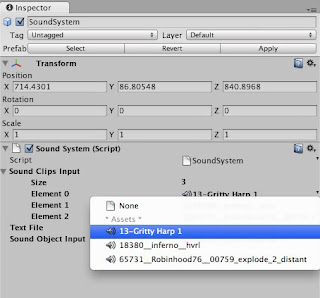
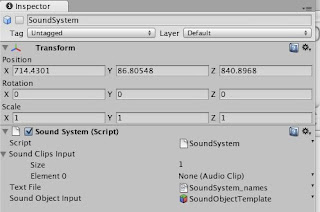
At a glance, the SoundSystem prefab I have built looks like this:


The script property called "Sound Clips Input" is a public array where you put all your sound clips.


You may notice that some of them have pretty weird convoluted names that will be impossible to remember when you want to call one. The solution is in that Text File property of the script.

The Text File links up the names you want to attach to the sound with their initial file names. At the moment, it has to be set up by hand, but for the scope of these projects, it won't take long enough to be an issue.

In my example project, the contents of the text file look a little something like this:

blues=13-Gritty Harp 1
rocket=18380__inferno__hvrl
bang=65731__Robinhood76__00759_explode_2_distant

On the left, the new name for the sound. On the right, separated by an '=' symbol, the original file name. This gets read and set up inside the SoundSystem script when the scene starts. Simple, no? (As testing progresses this week, I will put some thought into if there are more efficient ways to manage this.)

The Sound Object Input property contains a template "Sound Object", which is a GameObject containing a blank AudioSource. This is what I use to create and play what I call 'state-based sounds' - those that loop continuously when an object is in a certain state e.g. character footsteps. This template shouldn't really be editable - I suspect there is a way to link up script properties to assets in code rather than the inspector, which I will look into in a later iteration.

At the moment, the Sound System script contains three public static functions with which developers need be concerned. They can be called from any script in the game. It does not require an explicit reference to the SoundSystem object within each script. Just use this syntax:

SoundSystem.functionName(parameterA, parameterB);

These functions are as follows:

playOnce(string Name, GameObject Caller)

This function plays the sound with name Name once at the position of the GameObject Caller, and then immediately destroys the AudioSource and cleans it up. (For those interested, it uses Unity's built-in playClipAtPoint function).

The Name should be the name of the sound as specified in the text file, and the GameObject is the object at which you want the sound to occur. Usually this will be the object the script is attached to, which would be written as this.gameObject.

startLooping(string Name, GameObject Caller)

This starts the sound with name Name looping continuously at the position of the GameObject Caller.

It does this by instantiating the Sound Object Template prefab at the position of the Caller object and changing the blank AudioSource clip to the clip called Name. This new object is then parented to the Caller object, so that if the caller object changes position, the sound effect will pan and fade accordingly.

If there is already a Sound Object attached to the Caller GameObject, the script will simply call Play() on the AudioSource component of this object, rather than creating a new object.

stopLooping(string Name, GameObject Caller)

This finds the looping sound with name Name at the GameObject Caller and stops it playing.

If this function is called from an object that has no such sound playing, the Sound System will print an error to the console.

So, that's the basics of the Sound System.

I have also collated a bunch of placeholder sound effects to be used in most of the games, so I will be implementing and testing the system with the rest of the class this week. I have a list of things I would like to iterate on as I progress through the rest of semester, and I am sure my fellow developers will have useful things to add to it.

Sunday, March 21, 2010

Going solo

Hey there cats and kittens. This is your recently-appointed resident sound guy talking (okay, sound girl, technically, but that sounds naff and wishy-washy).

Finally getting around to blogging about my individual role for this semester's projects, so that all of you (my current developers-in-arms) what's going on, and what you can ask me for if you need it.

The way I am currently thinking about it, the role of sound in these projects can be broken down into three areas:

1. Design

The decision-making process. This is really key to the what, if any, impact sound has on the way the player plays the game, and the player's impression of the game.

Off the top of my head, this is the sort of stuff I can work with people on, if you guys want my input:

  • deciding where and if music or sound effects should be used
  • picking and choosing the right kinds of sounds and the right places to use them
  • what will they signify to the player?
  • do they serve as feedback or stimulus?
  • will the player be able to read them correctly?

2. Sound programming

I would really like to build some kind of simple system that everyone can use to easily organise and trigger sounds and music for their games (probably in Unity, since the majority of projects will be happening in that).

I haven't had a chance to think too deeply about this yet, and I would welcome feedback on the kind of system people would like in order to help them streamline the audio pipeline. How would you guys like to be able to handle sound in your scripting?

3. Composition/Recording

This one is slightly trickier. I am a little rusty in this area, and I am not sure how quickly I will be able to produce music and/or effects. At this stage, I'm going to say tentatively that I will do the music for two projects this semester. These are actually already pretty much set - I'd like to compose for Horse, because there is the potential for a lot of fun and silly chiptuning there, and Tyson has already lined me up to work on their Bullet game, so unless the projects get especially shuffled around these two are pretty much locked in.

That said, if people want me to record Foley or create SFX (or even come over to my place and do their own while I record), I am happy for this to be arranged.

Do let me know if you want this facility available to you as an option, because I need an excuse to go get a new mic + monitoring headphones, and I will need time to sort that out.

So, in a nutshell, get in touch if you want soundie stuff, kids.