The first build of the Sound Effects Handler for Unity is go!
It is a single invisible GameObject that sits quietly in your scene until you invoke one of its public static methods from another script, whereupon it makes some kind of noise. It is dead simple, but it took a while for my thinking to progress to the stage where I could make it so.
The basic premise of the handler is that it centralises all of the sound effects contained in the scene.
As far as I know, Unity is designed to handle sound by attaching to objects AudioPlayer components, the functions of which are then called from that object's script. While this approach has its uses, it is one that I can only imagine would be immensely frustrating for a sound designer who had no contact with the game other than to provide sound effects.
Funnily enough, this is the role that I am taking on with all of the class' projects bar Horse. I decided that I wanted an interface that allows me to put all the sound effects into a scene and then say to my fellow developers this:
"Here are your sounds. This is what they are called. Here are some simple lines of code to make them play or stop, which you can call from any other script in the scene. Have fun, please try to leave my code alone, and call me over if you have problems."
And this is exactly what I plan to do.
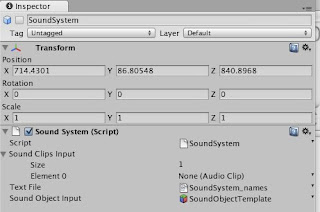
At a glance, the SoundSystem prefab I have built looks like this:
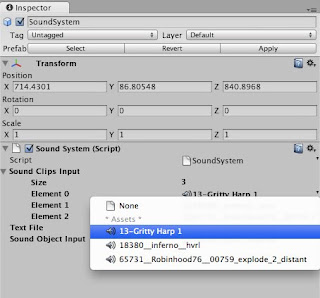
The script property called "Sound Clips Input" is a public array where you put all your sound clips.
You may notice that some of them have pretty weird convoluted names that will be impossible to remember when you want to call one. The solution is in that Text File property of the script.
The Text File links up the names you want to attach to the sound with their initial file names. At the moment, it has to be set up by hand, but for the scope of these projects, it won't take long enough to be an issue.
In my example project, the contents of the text file look a little something like this:
blues=13-Gritty Harp 1
rocket=18380__inferno__hvrl
bang=65731__Robinhood76__00759_explode_2_distant
On the left, the new name for the sound. On the right, separated by an '=' symbol, the original file name. This gets read and set up inside the SoundSystem script when the scene starts. Simple, no? (As testing progresses this week, I will put some thought into if there are more efficient ways to manage this.)
The Sound Object Input property contains a template "Sound Object", which is a GameObject containing a blank AudioSource. This is what I use to create and play what I call 'state-based sounds' - those that loop continuously when an object is in a certain state e.g. character footsteps. This template shouldn't really be editable - I suspect there is a way to link up script properties to assets in code rather than the inspector, which I will look into in a later iteration.
At the moment, the Sound System script contains three public static functions with which developers need be concerned. They can be called from any script in the game. It does not require an explicit reference to the SoundSystem object within each script. Just use this syntax:
SoundSystem.functionName(parameterA, parameterB);
These functions are as follows:
playOnce(string Name, GameObject Caller)
This function plays the sound with name Name once at the position of the GameObject Caller, and then immediately destroys the AudioSource and cleans it up. (For those interested, it uses Unity's built-in playClipAtPoint function).
The Name should be the name of the sound as specified in the text file, and the GameObject is the object at which you want the sound to occur. Usually this will be the object the script is attached to, which would be written as this.gameObject.
startLooping(string Name, GameObject Caller)
This starts the sound with name Name looping continuously at the position of the GameObject Caller.
It does this by instantiating the Sound Object Template prefab at the position of the Caller object and changing the blank AudioSource clip to the clip called Name. This new object is then parented to the Caller object, so that if the caller object changes position, the sound effect will pan and fade accordingly.
If there is already a Sound Object attached to the Caller GameObject, the script will simply call Play() on the AudioSource component of this object, rather than creating a new object.
stopLooping(string Name, GameObject Caller)
This finds the looping sound with name Name at the GameObject Caller and stops it playing.
If this function is called from an object that has no such sound playing, the Sound System will print an error to the console.
So, that's the basics of the Sound System.
I have also collated a bunch of placeholder sound effects to be used in most of the games, so I will be implementing and testing the system with the rest of the class this week. I have a list of things I would like to iterate on as I progress through the rest of semester, and I am sure my fellow developers will have useful things to add to it.